Claude Sonnet 5.5 explained for total beginners
Claude Sonnet 5.5, Anthropic’s everyday model, just got a big upgrade. Here’s what changed, plus the one spot where last week’s advice gets an exception.
What Sonnet 5.5 is, in plain words
Anthropic released Claude Sonnet 5.5 on September 28, 2026, six days after Opus 5.5. Both are models, the name for the AI that answers you inside the Claude app.
Picture two cooks in the same kitchen. Anthropic gives Sonnet the “well-scoped everyday tasks.” Opus gets the hard, open-ended work, and Anthropic says it’s still clearly stronger there.
Here’s what got better, according to Anthropic:
- It reads charts far better than Sonnet 5 did.
- On office-style work like spreadsheets and slides, it scores about even with Opus 5.5.
- Answers come out 30% faster or more.
- Requests that worked on Sonnet 5 should keep working.
That last point matters most for you. Nothing you learned last week goes in the bin. Every habit from the Opus 5.5 post applies here, with one exception I’ll get to below.
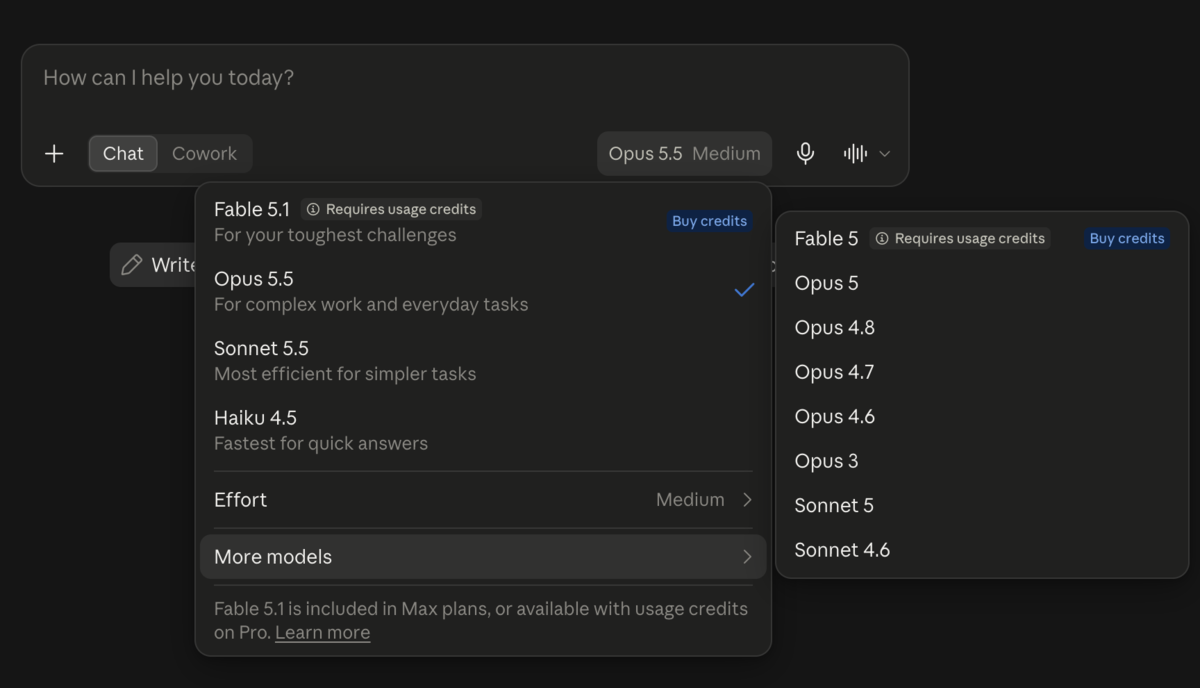
The Effort setting works the same way as last week: it controls how much the model thinks before it answers. Anthropic says its apps start Sonnet 5.5 on Medium, and both of my accounts showed exactly that. Leave it there for almost everything.
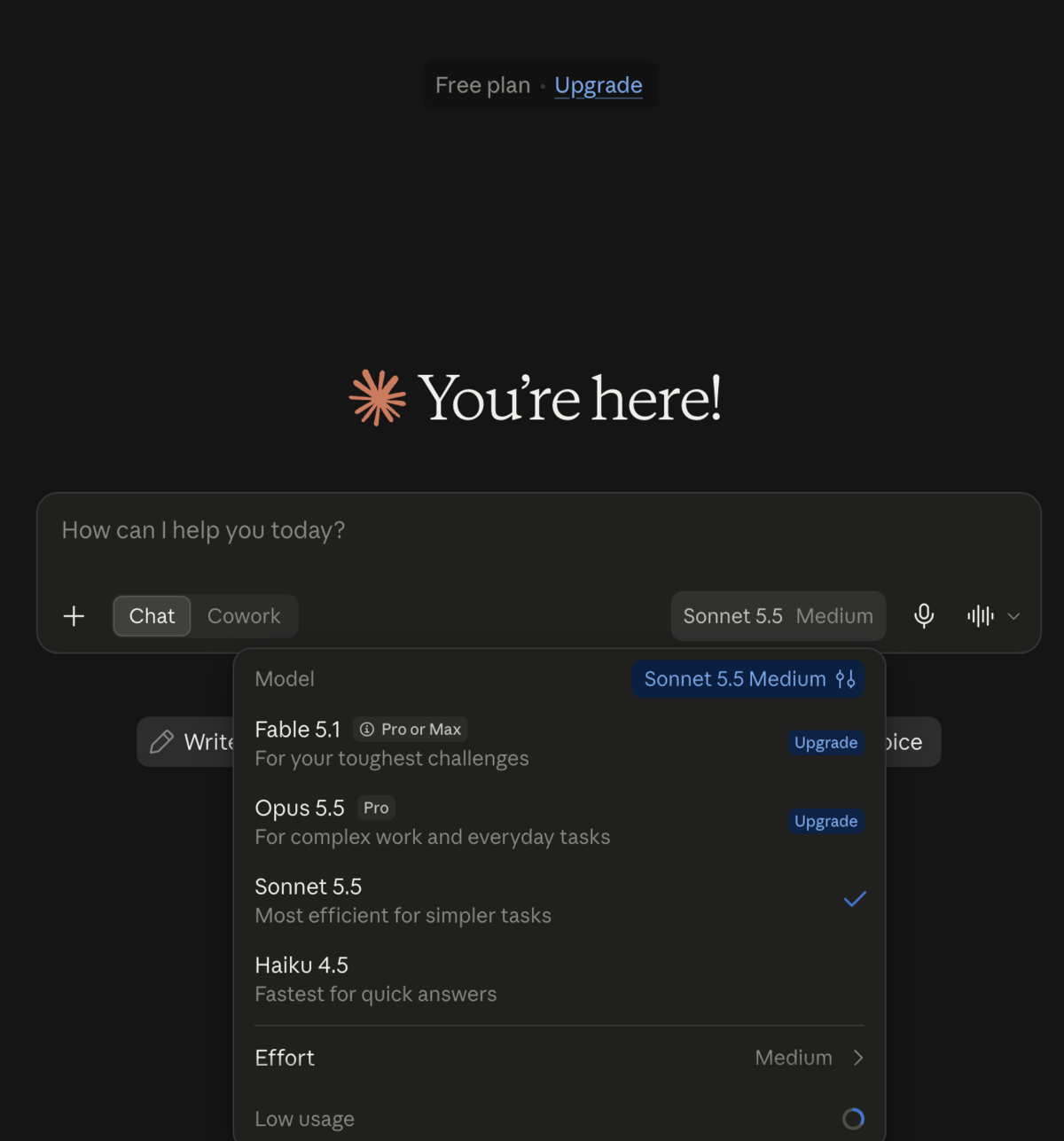
Good news if you don’t pay: free accounts get Sonnet 5.5. I checked the model menu on a free account on September 28, and there it was. Free accounts also get the same Effort menu now, where last week they had a slider between Budget and Intelligence. Every tip below works on the free plan.
How to talk to it
Short version: talk to it the way you talked to Opus 5.5. The table covers the spots where Sonnet 5.5 behaves differently, plus two habits worth repeating.
| When you want | Do this |
|---|---|
| A quick answer | Just ask. Leave Effort on Medium |
| Totals, rules or rankings from a document | Add “Work it through before you answer,” or move Effort up one step |
| Shorter thinking or a faster reply | Lower the Effort setting. Asking in words doesn’t reliably work |
| Only ideas | Say “Just give me ideas. Don’t build anything yet.” |
| Prices, rules or fees that may have changed | Add “Search the web to check current details, even if you’re confident.” |
| Help with a busy chart | Crop the screenshot to the part you care about |
| Max effort “to be safe” | Don’t. Medium is the right default |
Sources: Anthropic’s “Prompting Claude Sonnet 5.5” guide and its Sonnet 5.5 announcement. Most rows adapt advice Anthropic wrote for developers. The crop tip is my own suggestion.
The second row needs a word, because it looks like it breaks last week’s rule. It doesn’t. Last week I said to skip “think step by step,” and that still holds for most questions. That rule was about magic phrases pasted onto every request.
This line has a narrow job: numbers or rules pulled from a document. Anthropic’s guide says that on tasks like totaling figures or applying a rule, Sonnet 5.5 “often answers without thinking first, particularly at low and medium effort.” Medium is where the app starts.
The guide’s own line is “Think the problem through before you answer.” Mine is a paraphrase, worded so it doesn’t sound like the phrase you just dropped. Anthropic wrote the advice for developers, so treat it as a line that can help, and check my test below. Rather not type it? Move Effort up one step instead, the same move last week’s post suggested for hard tasks.
The ideas row comes from a warning in the same guide: an open-ended request can start “building a presentation” when you only wanted ideas. One sentence up front prevents it.
Prompts to copy
Swap the brackets for your own details. Use made-up numbers and public charts (a government statistics chart works well), never anything from work, and blur personal details before you share a screenshot.
Here's a screenshot of a chart. In two sentences, what does it say and what stands out?
Here's my list of expenses. Total them by category. Work it through before you answer.
Give me 5 ideas for [thing]. Just ideas, don't build anything yet.
Make a simple one-page budget spreadsheet from these numbers: [made-up numbers].
What does [public fee or rule] cost right now? Search the web to check, even if you think you know.
What happened when I tried them
I started with the chart prompt and a public map from Our World in Data: the share of each country’s population that used the internet in 2022 (ITU data, CC BY).
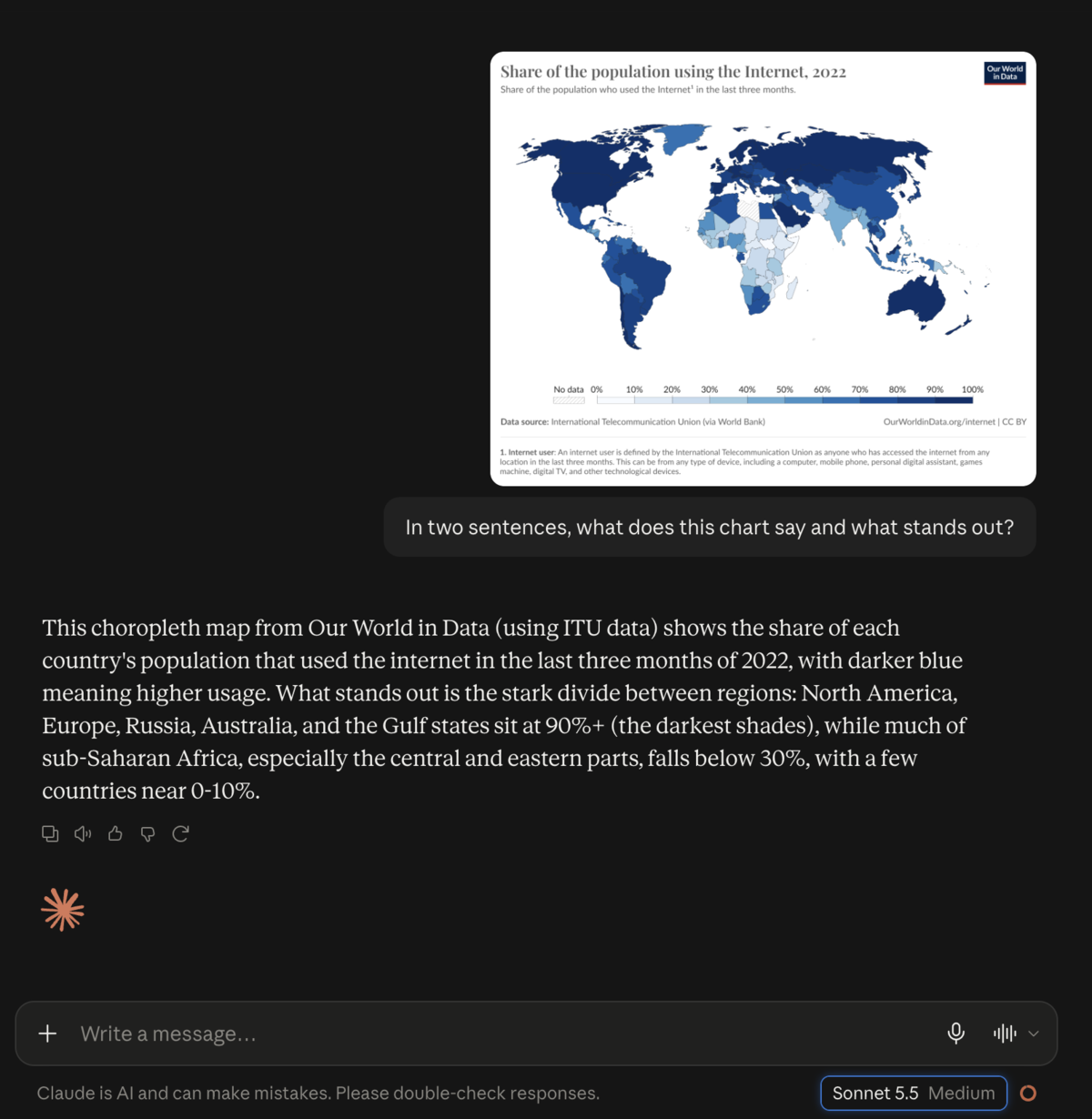
It named the source, explained that darker blue means more people online, and went straight to the real story: most rich regions sit above 90%, while much of sub-Saharan Africa is below 30%. That matches the map’s shading. Two sentences, as asked.
Then the test behind this post’s one exception. I made up an expense list with two traps: a dinner line with no amount, only “my share of $84.60 split 3 ways,” and a refund that has to be subtracted. I asked plainly, on Medium, without the extra line.
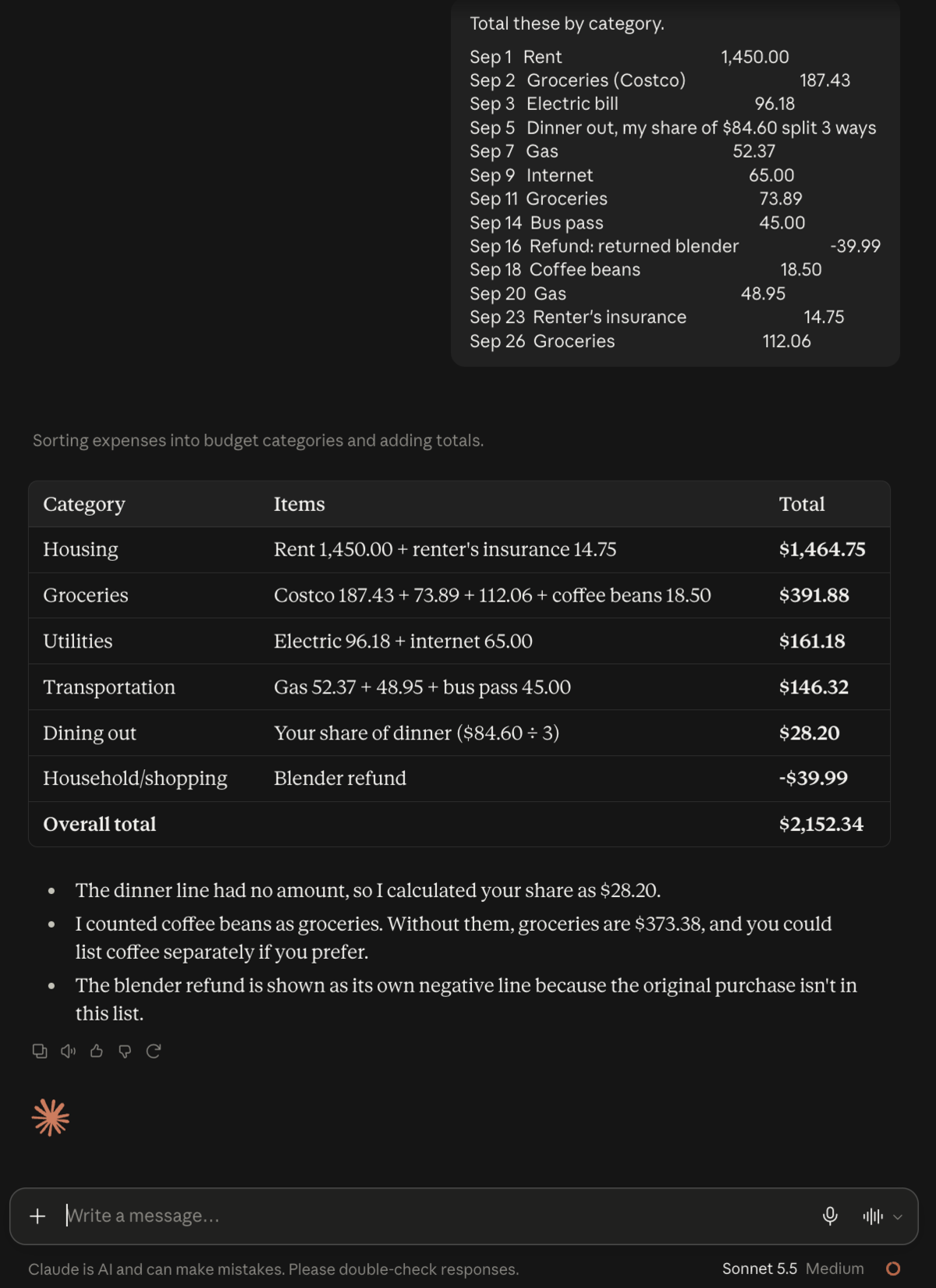
It got everything right. It worked out my dinner share as $28.20 and subtracted the refund, and its $2,152.34 total matches mine to the cent. So on a list this size the extra line wasn’t needed. I’m keeping it in the table as cheap insurance for longer, messier documents, not as a must.
Last, the ideas warning. I asked for five team offsite ideas and added “Just ideas, don’t build anything yet.”
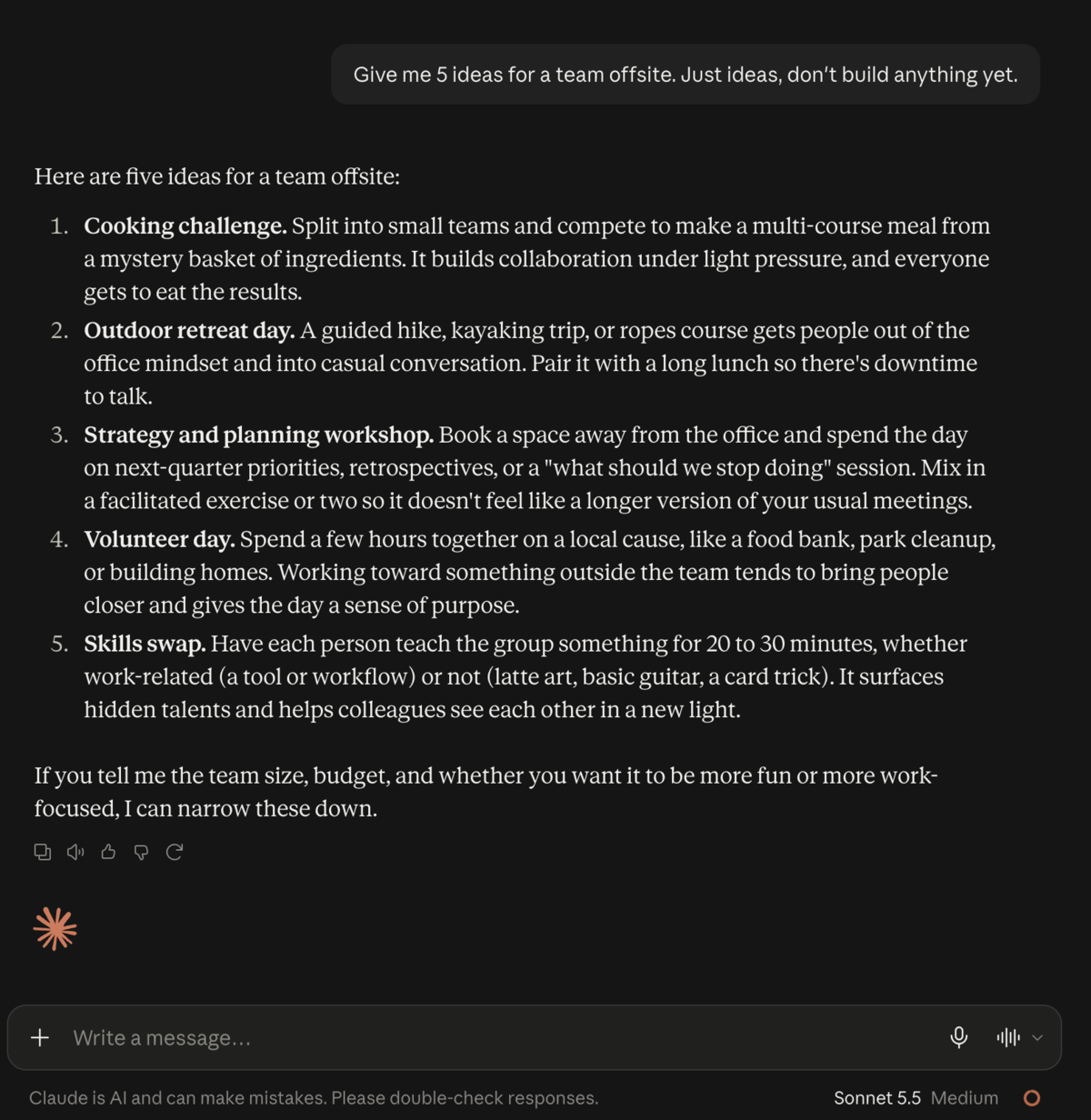
Five short ideas, then a question about team size and budget before going any further. That’s the behavior you want. I didn’t run the open-ended version, so the “it may start building” part is Anthropic’s warning, not something I saw myself.
For the curious: old vs. new
Numbers ahead. The short version: Sonnet 5.5 costs half as much as Opus 5.5 per token and lands close to it on several of Anthropic’s tests. Anthropic still says Opus “remains clearly stronger at difficult, open-ended work.”
Quick glossary. A benchmark is a standard test for comparing AI models. Vendor-reported means Anthropic tested its own model. A token is a chunk of text, roughly a short word. Effort is how much thinking the model does before it answers, the same setting you saw in the app’s menu. With tools means the model could use helpers, like running code, during a test. Without tools means it couldn’t.
| Sonnet 5.5 (new) | Sonnet 5 | Opus 5.5 | Opus 5 | Haiku 4.5 | |
|---|---|---|---|---|---|
| Released | Sep 28, 2026 | Jun 30, 2026 | Sep 22, 2026 | Jul 24, 2026 | Oct 2025 |
| Developer price, $ per million tokens in / out** | $2 / $10 | $2 / $10 | $4 / $20 | $5 / $25 | $1 / $5 |
| Knowledge cutoff | Jun 2026 | Jan 2026 | Jun 2026 | May 2026 | Feb 2025 |
| Default effort for developers | high | high | medium | high | n/a |
| Effort in the app | Medium (per Anthropic) | Medium (my screenshot, Sep 27) | Medium (my screenshot) | not checked | n/a |
| Speed | 30%+ faster output than Sonnet 5 | fast | 30%+ faster output than Opus 5 | baseline | fastest |
| Claude app plans | Free and up | Paid plans, under More models (was Free until Sep 27) | Pro and up, not Free | Pro and Max (at launch) | Free and up |
| Terminal-Bench 4.0, coding tasks | 70.6% | 10.3% | 66.4%* | 52.3% | n/p |
| GDPval-AA v2.1, office work (Elo score) | 1844 | 1449 | 1846 | 1708 | n/p |
| OSWorld 2.1, using a computer | 80.1% | 57.0% | 81.8% | 74.0% | n/p |
| Chartography, reading charts without tools | 61.6% | 15.6% | 64.4% | with-tools score only | n/p |
| Artificial Analysis index, highest effort (independent) | 56 | 38 | 58 | not captured | n/p |
**These are the prices at launch. I don’t promise to keep them up to date.
Benchmark rows are vendor-reported by Anthropic unless marked independent. n/p means not published alongside that model’s comparison. Opus 5’s benchmark scores come from Anthropic’s Opus 5.5 announcement. “At launch” is the plan setup when that model came out, which may have changed since.
*Opus 5.5’s Terminal-Bench score was measured at its highest effort setting, which Anthropic says represents the model’s best score.
A warning about the chart row. Last week’s post showed chart scores with tools, where Opus 5.5 hit 89.0%. This table’s scores are without tools, a harder setting. Don’t compare numbers across the two posts.
Effort deserves the same warning as last week, only louder. Artificial Analysis, an independent tester, ran Sonnet 5.5 at every effort level:
| Effort | Index score | Cost per test task |
|---|---|---|
| low | 36 | $0.41 |
| medium | 41 | $0.59 |
| high | 47 | $1.08 |
| xhigh | 52 | $2.74 |
| max | 56 | $7.60 |
Look at the jump at the bottom. At max, a task cost more than Opus 5.5’s $5.98 at its own max. The cheaper model stops being cheap once you crank it. Those are developer prices. My guess, not a measured fact: on a paid plan, heavier thinking also eats your usage limits faster.
Anthropic makes the same point from the other side. It says that on Medium, Sonnet 5.5 beats Sonnet 5’s best Terminal-Bench 4.0 score “for less than a tenth of the cost per task,” and that it costs up to 30% less per task than Sonnet 5 for most work.
Two smaller notes. Haiku 5.5, the lightest model in the family, will join “in the coming weeks,” per the announcement. And Anthropic says Sonnet 5.5 is the first Sonnet to beat Pokémon Red working only from screenshots, which is a fun way of saying its eyes got better.
Sources: Anthropic’s Sonnet 5.5 announcement, Prompting Claude Sonnet 5.5, Anthropic’s Opus 5.5 announcement, Claude pricing and Artificial Analysis’s cost-per-effort figures.
Your first move needs none of these numbers. Grab a chart you’ve been squinting at, upload it, and ask what it says.