The 5 parts of a good prompt, and the easiest to skip
When an AI gives you a bland answer, check your prompt before you blame the AI. A good prompt can have five parts, and one of them is very easy to skip.
A prompt is whatever you type into an AI chat app like ChatGPT, Claude, Gemini or Copilot. Here are its five parts, in plain words:
- Task: what you want done
- Context: the background only you know
- Examples: a sample of what good looks like
- Format: the shape of the answer
- Role: who the AI should act as
You won’t need all five every time. My rule of thumb: the Task is the only one every prompt needs. You add the rest when the answer has to fit you.
The names are my everyday versions of the parts in Learn Prompting’s guide to prompt structure, which uses more technical labels like “directive” and “output formatting.”
The five parts, before and after
Task. Say exactly what you want.
Before:
Help me with dinner.

After:
Give me 5 dinner ideas I can cook at home for my mom's 60th birthday.
Context. The background only you know. It gets its own section below, because it’s the one that slips.
Before:
Write a message to my landlord about the leak.

After:
Write a message to my landlord. The kitchen sink has been leaking
for a week. I texted him Monday and haven't heard back. I want to
stay polite because I plan to renew my lease in March, but I need
it fixed this week.
The second version tells the AI how long this has dragged on and why you can’t afford to sound angry.
Examples. Show it instead of describing it.
Before:
Write a thank-you text to my neighbor.

After:
Write a thank-you text to my neighbor for watering my plants.
Here's a text I sent once that sounds like me:
"You're the best!! Owe you tamales 🙏"
Match that vibe.
Anthropic, the company behind Claude, calls examples “one of the most reliable ways to steer” what the answer looks and sounds like.
Format. Tell it the shape you want back.
Before:
What do I need to buy for the dinner?

After:
Make the shopping list a checklist grouped by store section,
and keep it to one screen.
Other format asks that work well: “under 100 words,” “as a table,” “as a text message, no greeting” and “numbered steps.”
Role. Who the AI should act as.
Before:
Plan a party.

After:
Act as a friendly event planner who's great with tight budgets.
Plan a party for [the occasion].
Anthropic’s guide, written for developers, says a role focuses the AI’s behavior and tone, and that “even a single sentence makes a difference.” A role sets the angle and the tone. The AI still knows exactly what it knew before, so keep checking its facts.
Why context is the easy one to skip
Context is the background only you know that the AI needs in order to help you well.
It slips because it lives in your head. You know the budget and the deadline. The AI only knows what’s in the chat.
When something’s missing, it usually doesn’t stop to ask. It fills the gap with a generic guess, and generic guesses make bland answers.
Anthropic’s prompting guide puts it like this:
“Think of Claude as a brilliant but new employee who lacks context on your norms and workflows. The more precisely you explain what you want, the better the result.”
That line is about Claude, but it holds for any AI chat app. A brilliant new hire still can’t guess your budget.
Before you send a prompt that matters, run through five questions:
- Who is this for?
- What’s it for?
- What are my limits? Budget, time, skill, length.
- What have I already tried or decided?
- What would a great result look like?
Shortcut: if you asked a friend for this, what would they ask you first? Put those answers in the prompt.
Then try the test the guide calls its golden rule:
“Show your prompt to a colleague with minimal context on the task and ask them to follow it. If they’d be confused, Claude will be too.”
One more trick from the same guide: tell the AI why. Their example is “NEVER use ellipses,” which works worse than explaining that the answer will be read out loud by a text-to-speech program (software that reads text aloud) that can’t pronounce them. The guide says Claude “is smart enough to generalize from the explanation.” The reason is context too.
Try it: same AI, two prompts
Open two new chats in any AI app. Paste one prompt into each.
Give me birthday dinner ideas.
Give me 5 dinner ideas for my mom's 60th. 8 people, 2 vegetarians,
about $150, and I'm an average cook with one evening to prep.
Use new chats so the second answer can’t borrow from the first. If your app remembers things about you between chats, that can skew the test.
I ran both in Claude, on Sonnet 5.5, each in its own new chat. Claude’s memory was switched on in my account, so both chats could draw on what it remembers about me. The short prompt still got a generic answer. Here it is:
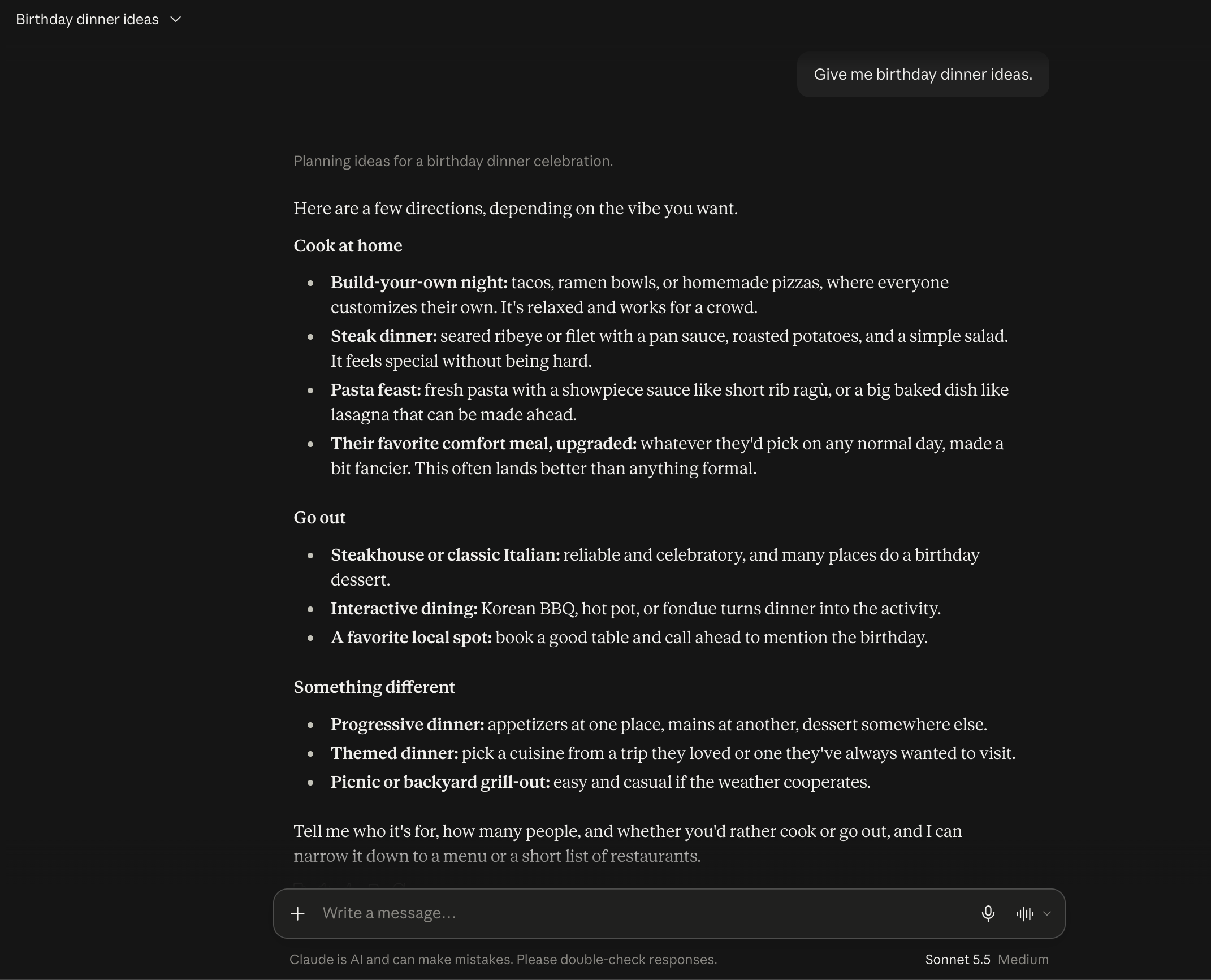
And the one with context:
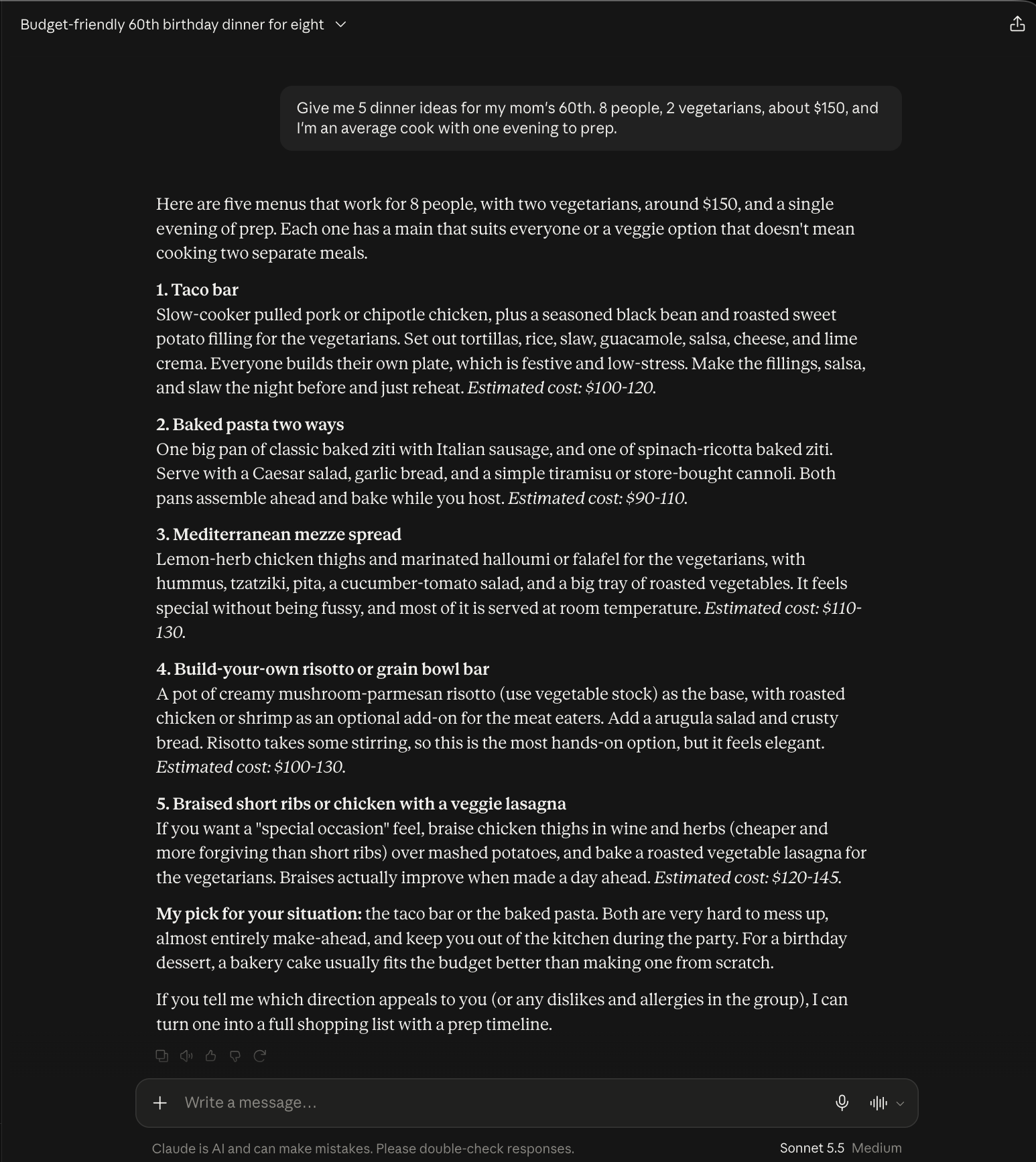
The first answer gave me directions, from ribeye to a night out at a steakhouse, with nothing about vegetarians or money. Notice that it guessed first. Only at the end did it ask who the dinner was for and how many people were coming, which is exactly the context I’d left out.
The second answer worked with what I gave it. Every menu has a vegetarian option built in and a cost estimate that stays under $150. It even picked the two that are hardest to mess up for an average cook: the taco bar and the baked pasta.
Here’s the full version with all five parts, background first and the request near the end:
Act as a friendly home cook who's great with budgets.
It's my mom's 60th birthday. There will be 8 people, 2 are vegetarian,
my budget is about $150, and I'm an average cook with one evening to prep.
She loves Mexican food.
Here's the kind of dish I mean: enchiladas I can make ahead and bake
right before guests arrive.
Give me 5 dinner ideas I can cook at home.
Put them in a short list with one line each on why it works,
and mark the vegetarian ones.
Line by line, that’s role, context, example, task and format.
The order comes from Learn Prompting. Its reasoning: when the request sits at the end, the AI is less likely to just keep writing your background. For short everyday prompts, any clear order works. Call it a handy habit. Nothing breaks if you write the request first.
Your cheat sheet
| Part | What it is | Ask yourself |
|---|---|---|
| Task | What you want done | What exactly do I want? |
| Context | The background only you know | What would a friend need to know? |
| Examples | What good looks like | Can I show one? |
| Format | The shape of the answer | List, table, short text? How long? |
| Role | Who the AI acts as | Who would be ideal to help? |
How many parts to use:
- A quick fact (“How many cups in a liter?”): Task only.
- Everyday help, like messages and plans: Task plus Context.
- A specific look or voice: add Examples and Format.
- Role: optional seasoning.
The more personal the result you want, the more parts you add.
This is part 1 of a beginner series. Each part gets its own entry, starting with context. Later on: what the AI remembers inside a chat, and when it’s time to start a new one.
Sources: Anthropic’s prompting best practices and Learn Prompting’s guide to prompt structure.
Your next step: open the last chat where you got a generic answer, add the context you left out, and ask again.